Subquery
다중행 서브쿼리(Multiple-row subquery)
다중행 비교 연산자
any(or)
=any (= + or) : in
>any (> + or) : 최소값보다 크면 됨
>=any (>= + or) : 최소값보다 크거나 같으면 됨
<any (< + or) : 최대값보다 작으면 됨
<=any (<= + or) : 최대값보다 작거나 같으면 됨
<>any (<> + or) : 활용도가 낮음 (값이 하나만 넘어왔을 때는 사용할 수 있지만 <>를 쓰는게 더 나음)
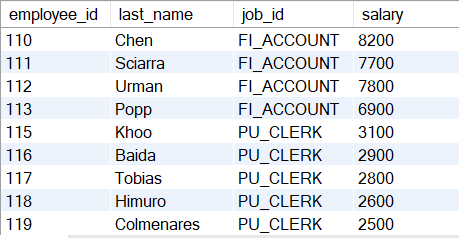
SELECT employee_id, last_name, job_id, salary
FROM employees
WHERE salary <any (SELECT salary
FROM employees
WHERE job_id = 'IT_PROG')
AND job_id <> 'IT_PROG';
all(and)
=all (= + and) : 활용도가 낮음 (값이 하나만 넘어왔을 때는 사용할 수 있지만 =를 쓰는게 더 나음)
>all (> + and) : 최대값보다 크면 됨
>=all (>= + and) : 최대값보다 크거나 같으면 됨
<all (< + and) : 최소값보다 작으면 됨
<=all (<= + and) : 최소값보다 작거나 같으면 됨
<>all (<> + and) : not in
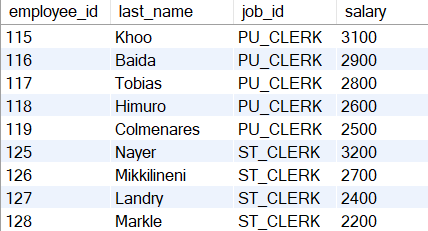
SELECT employee_id, last_name, job_id, salary
FROM employees
WHERE salary <all (SELECT salary
FROM employees
WHERE job_id = 'IT_PROG')
AND job_id <> 'IT_PROG';
ex1) 다중컬럼 서브쿼리 + 다중행 서브쿼리
select employee_id, first_name, department_id, salary
from employees
where (department_id, salary) in (select department_id, min(salary)
from employees
group by department_id)
order by department_id;
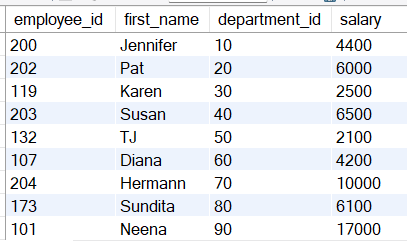
다중컬럼 서브쿼리 + 다중행 서브쿼리에서는 컬럼의 짝이 맞아야한다.
ex2) 자기자신이 매니저가 아닌 사원
select last_name
from employees
where employee_id not in (select manager_id
from employees);
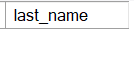
결과값이 없음(null값 출력)
원인 : 다중행 서브쿼리로부터 넘어오는 값리슽트에 null값이 포함되어 이쓴ㄴ데 메인 쿼리에 and 성격을 가지는
비교연산자를 사용하면 전체 결과는 null
ex2 수정)select last_name
from employees
where employee_id not in (select manager_id
from employees
where manager_id is not null);
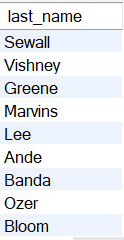
연습문제1)
employees 테이블에서 Abel과 동일한 부서에 소속된 사원들의 last_name, hire_date를 출력하되 비교의 대상인 Abel은 제외select last_name, hire_date
from employees
where department_id in (select DEPARTMENT_ID
from employees
where last_name = 'Abel')
and last_name <> 'Abel';

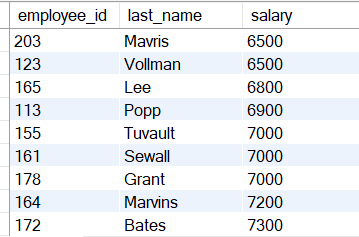
연습문제2)employees 테이블에서 평균 이상의 급여를 받는 사원들의 employee_id, last_name, salary를 출력하되
급여를 기준으로 오름차순select employee_id, last_name, salary
from employees
where salary >= (select avg(salary)
from employees)
order by salary;
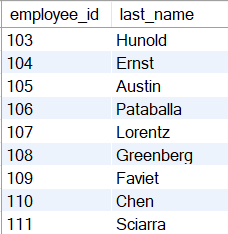
연습문제3)employees 테이블에서 last_name에 'u'가 포함된 사원과 같은 부서에 근무하는모든 사원의 employee_id, last_name을 출력select employee_id, last_name
from employees
where department_id in (select department_id
from employees
where last_name like '%u%');
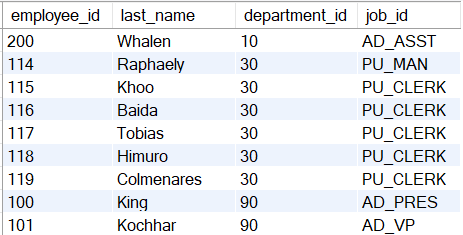
연습문제4)
employees 테이블과 departments 테이블을 사용하여
location_id가 1700인 부서에 소속된 사원들의 employee_id, last_name, department_id, job_id를 출력
select employee_id, last_name, department_id, job_id
from employees
where department_id in (select department_id
from departments
where location_id = 1700);
연습문제5)
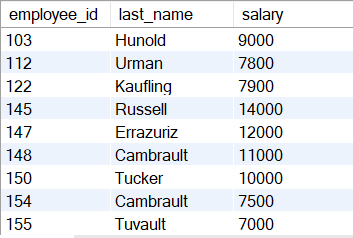
employees 테이블에서 평균 이상의 급여를 받으면서 last_name에 'u'가 포함된 사원과
동일한 부서에 소속된 사원들의 employee_id, last_name, salary를 출력
select employee_id, last_name, salary
from employees
where last_name in (select last_name
from employees
where last_name like '%u%')
and salary >= (select avg(salary)
from employees);
연습문제6)
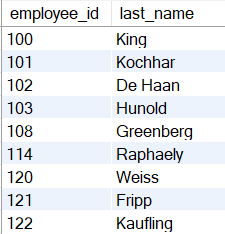
employees 테이블에서 본인이 매니저 역할을 하는 사원들의 employee_id, last_name을 출력
select employee_id, last_name
from employees
where employee_id in (select manager_id
from employees
where manager_id);
연습문제7)
employees 테이블과 departments 테이블을 사용하여 직원이 소속되어 있지 않은 빈 부서의 department_id, department_name을 출력select department_id, department_name
from departments
where department_id not in (select department_id
from employees
where department_id is not null);

데이터 조작어(DML)
테이블에 데이터를 삽입, 수정, 삭제하는 명령어
종류로는 데이터 삽입(새로운 행 수행) insert, 데이터 수정(기존 행 수정) update, 데이터 삭제(기존 행 삭제) delete
데이터삽입 : INSERT
테이블에 특정 행을 삽입하는 명령어
SQL> INSERT INTO 테이블명[(컬럼명1, 컬럼명2, ....)]
VALUES (값1, 값2, 값3,...);
테이블의 기본 컬럼 순서를 알 때, 테이블명 뒤에 컬럼리스트를 생략한 경우에는
반드시 VALUES절 뒤에 기본 컬럼 순서대로 모든 값을 나열해야함
INSERT INTO departments
VALUE (280, 'Java', 107, 1700);
테이블명 뒤에 컬럼리스트를 작성한 경우
VALUE절 뒤에 값리스트와 짝이 맞아야함
INSERT INTO departments(department_name, location_id, manager_id, department_id)
VALUE ('Jsp', 1700, 108, 290);
null값을 자동으로 삽입하는 방법INSERT INTO departments(department_id, department_name)
VALUE (300,'MySQL');생략된 컬럼에 자동으로 null값이 삽입됨
null값을 수동으로 삽입하는 방법
INSERT INTO departments
VALUE (310,'Oracle', null, null);
null 키워드 사용
subquery가 사용된 INSERT 구문 : 다른 테이블로부터 데이터를 복사해서 삽입
INSERT + subquery 예제1)
sales_reps 테이블 생성
create table sales_reps (id int, name varchar(20), salary int, comission_pct double(22,2));
desc sales_reps;
employees 테이블에서 REP란 문구가 포함된 업무 담당자 정보를 sales_reps 테이블로 복사
insert into sales_reps(id, name, salary, commission_pct)
select employee_id, last_name, salary, commission_pct
from employees
where job_id like '%REP%';
select * from sales_reps;
INSERT + subquery 예제2)
create table copy_emp
as select *
from employees
where 1=2;
copy_emp 테이블 생성(employees 테이블과 구조가 동일한 테이블) 구조만 employees와 같음. 데이터는 없음.
insert into copy_emp
select *
from employees;
employees 테이블의 모든 데이터를 copy_emp 테이블로 복사
다중행 삽입하기(MySQL DBMS 문법)insert into departments
values (320, 'Html', 200, 1700),
(330, 'Javascript', null, 1700),
(340, 'Linux', 201, null);
'KDT > DB' 카테고리의 다른 글
| 231220 DB - 데이터 정의어 2 (0) | 2023.12.20 |
|---|---|
| 231213 DB - 데이터 조작어 2, 트랙잭션 제어어, 데이터 정의어 1 (0) | 2023.12.13 |
| 231206 DB - 그룹 함수와 그룹화 2, 서브쿼리 1 (0) | 2023.12.06 |
| 231129 DB - 단일행함수 3, 그룹 함수와 그룹화 1 (0) | 2023.11.29 |
| 231124 DB - 단일행 함수2 (0) | 2023.11.24 |